
“Who's picking up the kids today?”
If you asked that question in your own house this week, and you already knew the answer before anyone replied — you are carrying the mental load. You are the family's calendar, the family's memory, and the family's alarm clock. And you got there without anyone deciding you should.
The mental load isn't about household tasks getting done. It's about who has to remember. The dance leotard needs to be clean by Thursday. The permission slip is due Friday. The dentist moved the appointment. Someone tracks all of that. Usually it's the same person, usually forever, and the research is clear: in most mixed-gender households, that person is the mother.
Why it lands on one person
Not because anyone's lazy. Because whichever parent first started tracking the details kept tracking them, and because the cost of handing off — explaining, reminding to remind — is higher than just doing it yourself. The load concentrates the way water pools. Downhill, toward the lowest point of friction.
The other parent isn't uninvolved. They'd genuinely help if they knew. But knowing is the work. Knowing that Tuesday is a half day. Knowing that the soccer kit is in the dryer, not the drawer. Knowing that the babysitter prefers cash. The person who knows is the person the household runs on, and they can't stop knowing even when they want to.
The point is not that the household is unfair. The point is that one person is the household's memory, and memory doesn't get a day off.
What a calendar can and can't fix
A shared calendar doesn't fix a relationship. It doesn't rewrite who does the laundry. What it can do — if it's built for this, and most aren't — is flatten the knowing.
A grid calendar with a single column shared between family members is a memory test. Everything merges into one stripe of entries; the week reads like a receipt. You still have to hold the map in your head.
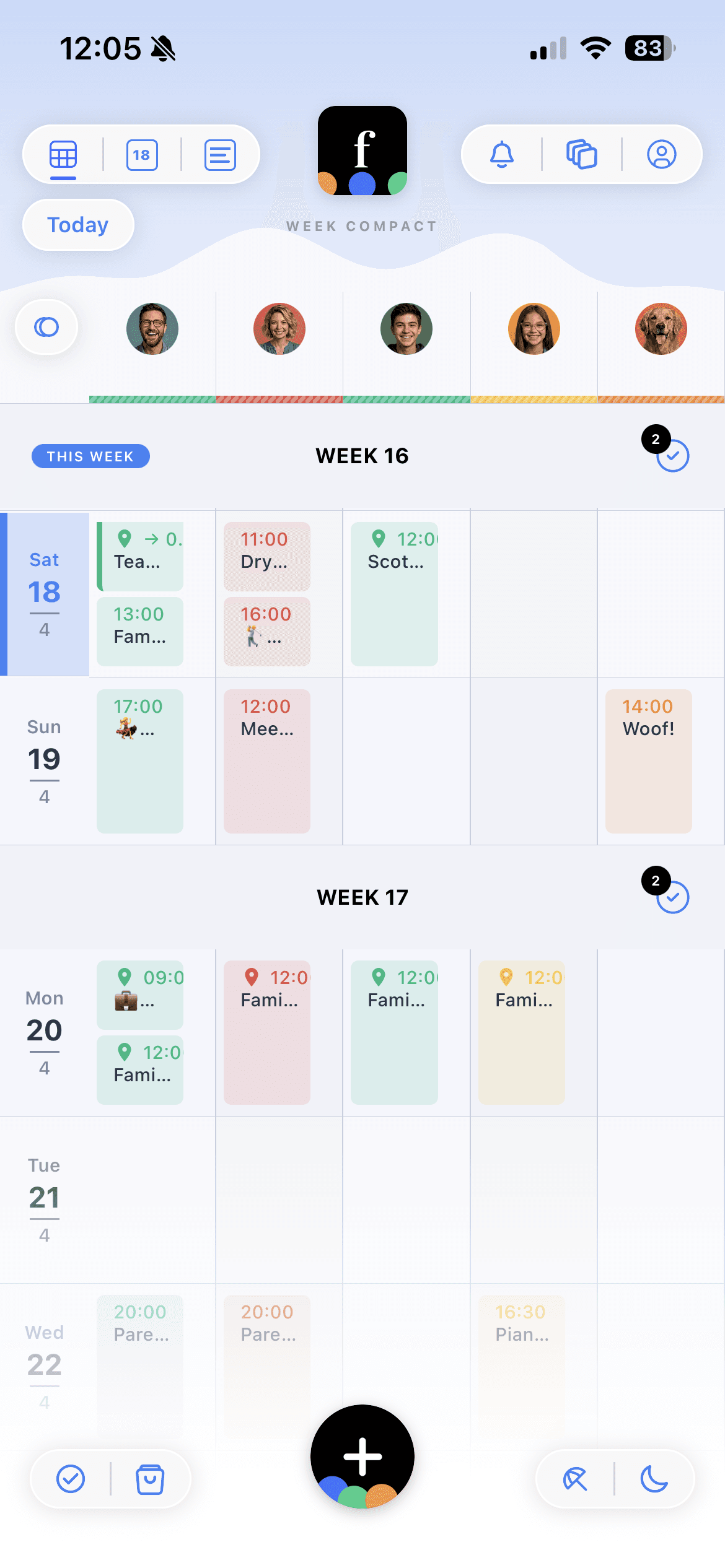
A family calendar with every member in their own color column is a map on the page. You open it and you can see. The week reads like a diagram, not a list. Nobody is holding anything — the calendar is.
Reminders go to the person, not the scheduler
In most calendar apps, the person who creates the event is the person who gets the reminder. That's backwards. If you added soccer practice for your eleven-year-old, you already remember it — you just added it. The person who needs the reminder is the parent picking them up, or the kid packing their bag.
Famnly sends the reminder to everyone assigned to the event. You stop being the fallback. If it's Dad's pickup, Dad's phone buzzes thirty minutes ahead. If the kid is old enough to have their own Famnly account, so does theirs. You've stopped being the alarm clock.
Details live inside the event, not in a DM thread
The other place the load hides is in the details. The gymnastics coach's new number. The pickup instructions: “use the side door because the front lot is being repaved.” The swap: “I'll take Thursday if you take Monday.” In most households, this information is spread across text threads, shared notes apps, and one parent's head.
Every Famnly event has its own comment thread. The pickup instructions sit with the pickup. The coach's number sits with the practice. If either parent wants to know, they open the event — not a DM scroll from three weeks ago. Co-parents in separate households get the same benefit: the decision about who takes Thursday lives on Thursday.
Everyone sees their week, including the kids
The part most family calendars skip: kids can't use them. They don't have email accounts, the interfaces are built for adults, and the parent ends up relaying the schedule back to the child anyway.
A kid who can read their own calendar packs their own bag. That's not just less work for you — it's a developmental move. They learn that Tuesday is a half day, that Thursday is swimming, that next Saturday is a birthday, because the information is on their own screen in their own color. They stop needing to be reminded to remember.
How to actually set it up
If you're starting from zero — one parent's head full of the week, the other parent genuinely willing to help — the setup takes about fifteen minutes.
- 1Add every family member, including pets and regular places (grandma's house, the nanny's). Give each one their own color. This is the part that matters — the colors are how the week becomes readable.
- 2Invite your co-parent. Parents can add, edit, and see everything; there's no “admin” hierarchy that leaves one person doing all the work.
- 3Connect your work calendar (Google, Outlook, Apple). Two-way sync means work conflicts show up in the family view, and nobody double-books Thursday at 3.
- 4Make child accounts for any kid old enough to read their own schedule. Nine or ten is usually the floor; some kids are ready sooner.
- 5For the first two weeks, add events with assignees and locations — not just a time. The first time your co-parent gets a pickup reminder without you sending it, you'll feel the shift.
None of this cures the unequal distribution of household work. It does something narrower: it takes the part that's pure memory — who, when, where — and moves it out of one person's head and onto a screen everyone shares. What you do with the room that frees up is a different conversation, and a better one to have than “did you remember”.