It's 10:30 on a Tuesday and both of you are still at the kitchen table. The laptop is open to a Google Sheet called “Summer 2026 v4 FINAL (revised).” One of you thinks grandma has week 28. The other one is sure week 28 is already the cabin. The row that used to say “week 28: ?” now says “week 28: discuss” and has said that for eleven days.
The argument you're about to have isn't about which week grandma has. It's about the spreadsheet. The sheet is three edits behind what either of you actually agreed to. Neither of you remembers which version is the real one. The dog isn't on the sheet at all.
Why the spreadsheet always loses
A spreadsheet is a grid waiting for you to know what to put in it. It doesn't ask who's going. It doesn't ask what weeks the kids are out of school. It doesn't know that week 30 is a gap you haven't covered, or that the dog needs a plan, or that the Tuesday you picked for the drive is also a work conflict for one of you.
A family vacation has a shape. Who's going. What weeks are free. Which of those weeks are covered and which aren't. What trips happen inside those weeks. Who's looking after the pet. The spreadsheet treats all of that as free-form cells, and the order you think of them in becomes the order you argue about them in. That's why every draft is version four.
The other thing a spreadsheet can't do: become a calendar. Even when you finally agree, the sheet is a photograph of the plan. You still have to retype every block into Google Calendar, one event at a time, and whichever parent does that step becomes the holder of the plan again. You were trying to share the load. You ended up re-centralizing it.
The sheet isn't the plan. It's a record of the last time you tried to agree.
A wizard that asks the right questions in order
Famnly's Vacation Planner is seven steps. It asks what a spreadsheet can't: the school break, who's going, which weeks are vacation, which of the remaining weeks need coverage, any trips inside the plan, what happens to the pet, and a name at the end. The order matters. You can't assign gap coverage before you know the gaps. You can't plan a trip before you know the weeks. The wizard walks you through the decisions in the order they unlock each other.
Gap weeks become a named problem
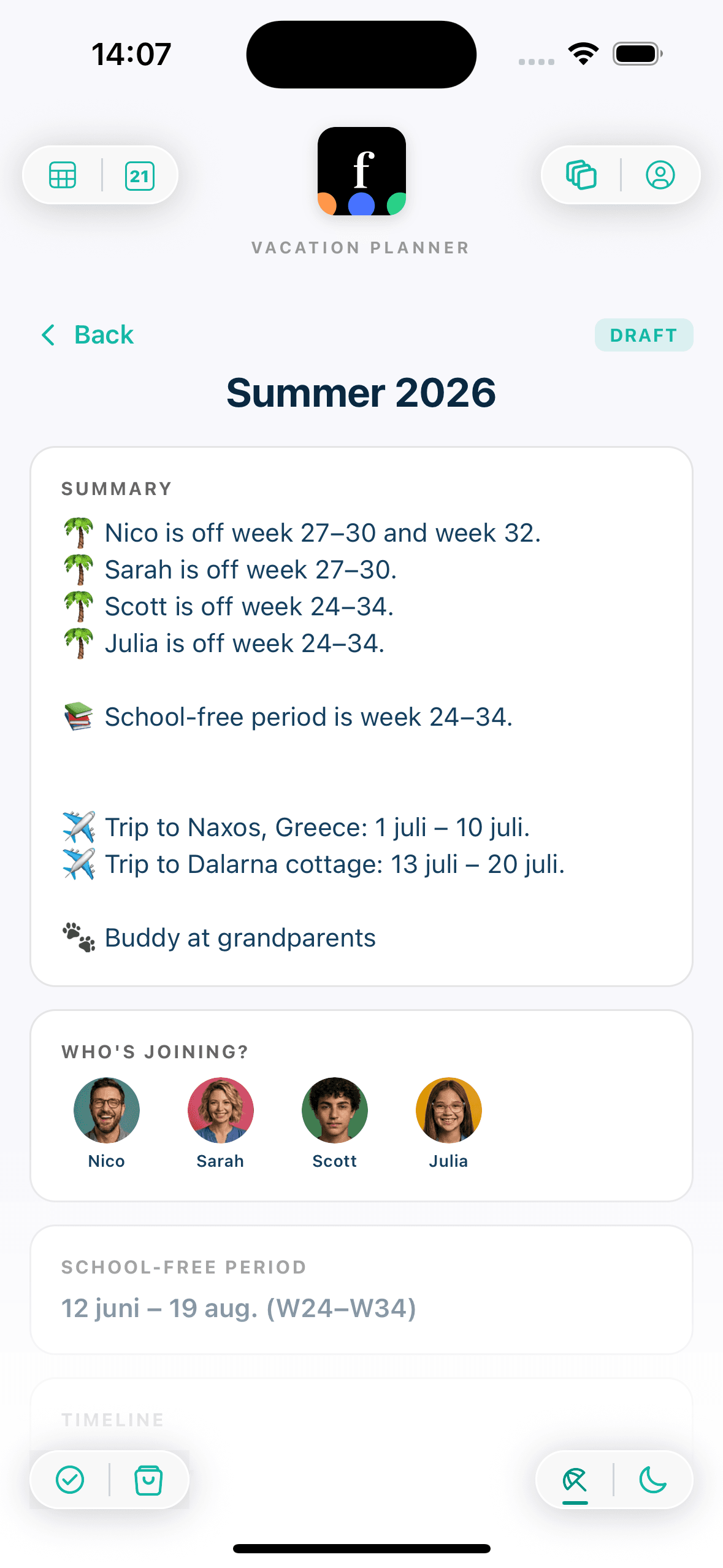
In a spreadsheet, the gap is the row you keep leaving blank. In the wizard, it's a step. The app shows you every school-break week you haven't marked as vacation and asks one question for each: who's covering this. You pick from Grandparents, Camp, Remote Work, or Other, and the week stops being a question mark. If grandma takes week 28, week 28 gets a color and a label. If you're working remotely through week 30, week 30 does too.
Trips live inside the vacation, not beside it
A family vacation is usually not one continuous thing. It's two weeks at home with a road trip in the middle, or a cabin from Friday to Tuesday, or a long weekend at the in-laws during the second week. The wizard lets you add trips with a destination and dates inside the vacation you already chose. The trip doesn't replace the vacation block — it sits inside it, which is how your brain already thinks about it.
The pet gets a column
The step that a spreadsheet almost always skips. If the family has a pet, the wizard asks what happens to them during the vacation — Coming with us, Friends, Grandparents, Kennel, or Pet sitter. Each option has its own color so the pet's plan reads as clearly as a kid's. It is wildly underrated how much of a family argument happens in the last forty-eight hours before a trip because nobody decided about the dog.
How to actually use it
If you're starting from a spreadsheet that's already three versions deep, give yourself twenty minutes and do it in one sitting. Both parents in the same room is ideal; one parent with the plan already half-agreed is fine too, because the draft can be discussed before anyone finalizes.
- 1Set the school break. If any kid in the family is a minor, the wizard asks for the start and end of the school-free period. This is the frame for everything else — gap weeks only exist against this boundary.
- 2Pick who's going. The wizard lists every family member. Select the ones on this specific vacation. The grandparent who only shows up for week 28 can be included for that week; the teenager who has a summer job can be left out.
- 3Mark the vacation weeks. Tap weeks on the calendar grid or switch to custom dates for a Friday-to-Tuesday cabin. These are the blocks that will become real calendar events when you finalize.
- 4Cover the gaps. The wizard shows each school-break week you didn't mark as vacation and asks who's covering it: Grandparents, Camp, Remote Work, Other. Pick one per gap. You can leave a gap uncovered, but you'll see it.
- 5Add trips. If the family is going somewhere inside the vacation, add a destination and dates. Trips can nest inside a vacation block — a three-day cabin visit inside a two-week home stretch.
- 6Handle the pet. If there's a pet in the family, assign Coming with us, Friends, Grandparents, Kennel, or Pet sitter. Each has a color; the pet's plan becomes as readable as a kid's.
- 7Name the plan and save. Review the summary, give it a name like “Summer 2026,” and save. It's a draft — everyone with access to the family can see it, comment on the plan's own thread, and push back before it's real.
- 8Finalize when you're ready. The DRAFT becomes FINALIZED, and every vacation block and trip becomes a real event on the family calendar. From this point on, the plan is the calendar.
What the wizard won't do
It doesn't pick your destination. It doesn't book the cabin. It doesn't tell you whether grandma really has the patience for a whole week of the kids this year. It doesn't do your budget. None of the hard parts of a vacation are what the wizard is trying to replace.
What it does replace — narrowly — is the spreadsheet. The part where the plan lives in a document neither of you trusts, where updates drift, where the final step is still retyping everything into the calendar by hand. The wizard takes the coordination and makes it the easy part. The trip itself is still yours to plan.