It's 5:47 on a Thursday and your phone buzzes: “Wait, was Maya supposed to be at soccer at 5?” You read the message twice. You'd dropped her at your co-parent's place on Sunday. You hadn't thought about soccer since.
The fight you're about to have isn't really about soccer. It's about the fact that one of you knew, one of you didn't, and the kid is the only other person who could have kept the thread alive. Co-parenting arguments rarely start with the schedule. They start with the gap between what one parent knows and what the other parent assumes.
Why it keeps happening
When you lived together, the schedule lived in one house. One fridge calendar, one set of texts, one parent bearing the memory. After you split, the schedule tried to follow along in whichever shape you'd been using — a shared Google Calendar you set up in a hurry, a text thread, a paper calendar at whichever house, a memory you're no longer sharing.
None of those are the problem exactly. Each of them hides the same flaw: there's no single place both adults can look to know the week. The schedule lives in whichever app the more organized parent prefers. Updates drift. One of you makes a change and assumes the other will see it. The kid ends up being the courier. That's the moment the friction starts.
When the calendar is the source of truth, nobody has to be.
What “shared” actually needs to mean
A shared calendar isn't just a calendar both people can open. It's a calendar where the details live with the event. Where the reminder goes to the person responsible, not the person who typed it in. Where a change in one house updates the other house without anyone being told to pass it on.
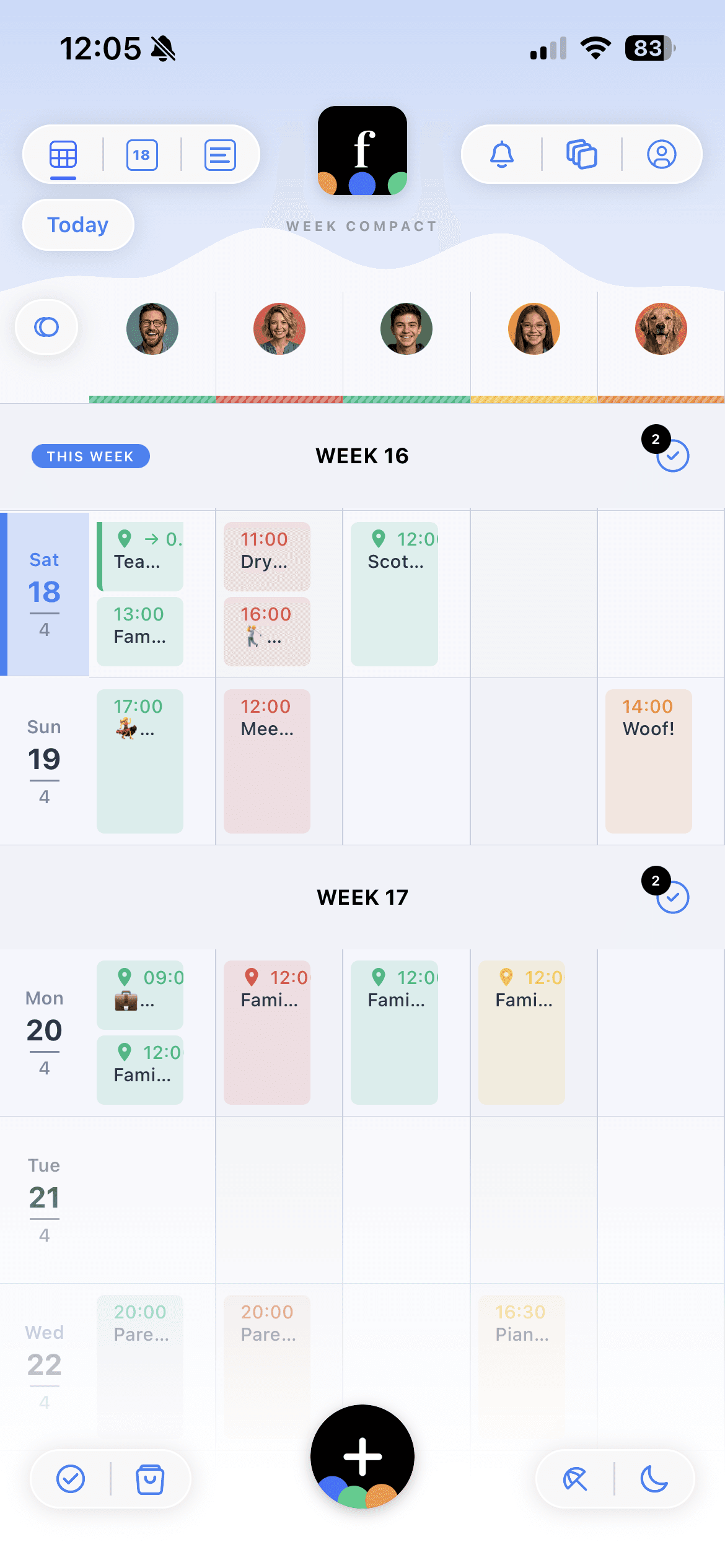
The details live with the event, not in a DM
Every Famnly event has its own comment thread. The new soccer drop-off point. The coach's number. The fact that Maya forgot her shin guards last week. If either parent wants to know, they open the event — not a month-old text thread. The pickup time sits with the pickup. The swap request sits with the day it's about.
Reminders find the parent who needs them
In most calendar apps, whoever created the event gets the reminder. If you scheduled a Thursday pickup, your phone is the one that buzzes — whether or not Thursdays are yours. Famnly sends the reminder to everyone assigned to the event. If Thursday is Dad's, Dad's phone buzzes thirty minutes ahead. You stop being the fallback alarm for the other household.
Kids see the same week from either house
Once a child is old enough to read their own schedule — somewhere around nine or ten — they can have their own Famnly account. A parent generates a six-character code, the kid enters it on their phone, and they land in a view built for their age: their own events, their own chores, their own day. A kid who can read their own calendar stops being the messenger. “Is it your weekend or Dad's?” becomes a question they don't have to route through either adult.
Setting it up in one evening
If you and your co-parent are starting from two separate text threads and a rough custody pattern, the setup takes about thirty minutes. Do it on a night the kids are with whichever parent — you'll want five uninterrupted minutes of attention at a time.
- 1Add every family member, including the kids and any third-party caregivers (grandparent, nanny, afterschool). Give each one their own color. This is the part that matters most — the colors are how both households skim the week.
- 2Invite your co-parent as a parent, not a guest. Both of you need edit access; one-sided visibility is the problem you're trying to fix, not a constraint to preserve.
- 3Connect each of your work calendars separately (Google, Outlook, Apple). Two-way sync keeps your work events in your own color. The other parent sees the conflict without seeing the meeting.
- 4Tag the custody pattern. Create a recurring event for every transition — “Pickup: Dad's week starts” every other Friday, assigned to both parents and the relevant kids. The notification ships automatically from then on.
- 5Make child accounts for any kid old enough to read. A child with a code on their own phone stops having to relay the schedule between two houses.
- 6For the first two weeks, put every change — swaps, cancellations, pickup tweaks — in the event's comment thread. It feels redundant for a week. By week three, nobody's opening the text thread for scheduling.
What a shared calendar doesn't do
It doesn't fix a relationship that's already inflamed. It doesn't resolve who should have more weekends. It doesn't make the other parent reply faster. What it does — narrowly — is remove the class of fight that starts with “I didn't know” and ends with “you should have told me”. The schedule stops being a thing either of you owns, and starts being a thing the family has.
Some co-parents prefer not to install another app. Famnly publishes the family calendar as an ICS feed, so the less-involved parent can subscribe from Google Calendar, Apple Calendar, or Outlook and see the same week in their existing tool. It's not as good as both parents being in the same app — reminders don't route to them — but it's better than two separate calendars pretending to stay in sync.